ML Explainability & Interpretability
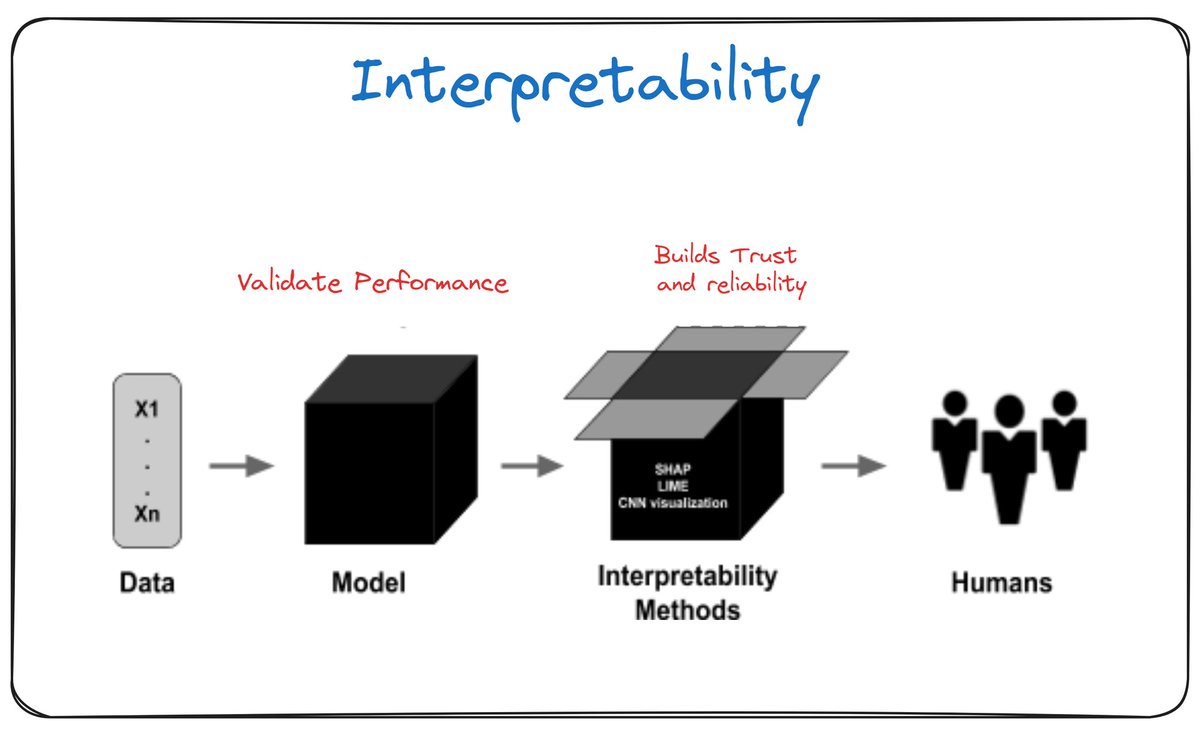
Introduction
This article is a comprehensive and practical resource for mastering explainability and interpretability in Machine Learning. Designed for Data Scientists, ML Engineers, and AI Researchers, it covers:
✅ Solid Fundamentals - Key concepts, types of explanations
✅ Practical Methods - SHAP, LIME, PDP, ALE, Counterfactuals
✅ Informed Choices - Decision framework for choosing the right method
✅ Real-World Debugging - Solutions to common problems
✅ Causality - Difference between correlation vs causation
✅ Production-Ready - Architecture, APIs, monitoring
✅ Benchmarks - Quantitative performance comparisons
✅ Best Practices - Proven checklists and workflows
Objective
- When and how to use each explainability method
- Identify and resolve common problems (contradictory SHAP, unstable LIME, etc.)
- Deploy to production performant explanations (< 100ms)
- Understand the difference between correlational and causal explanations
- Audit and mitigate biases in your models
- Follow best practices from the industry
Learning Path Overview
1
2
3
4
5
6
7
8
9
10
11
📚 Fundamentals          🛠️ Practice              🚀 Expert
─────────────────────   ────────────────────    ─────────────────────

Basic Concepts     →    Choose Method      →    Causal Inference
    ↓                        ↓                        ↓
Global vs Local    →    Debugging          →    Production Deploy
    ↓                        ↓                        ↓
Methods (SHAP,     →    Benchmarks         →    Monitoring & Scale
 LIME, PDP...)              ↓                        ↓
    ↓                   Best Practices      →    Complete Checklist
Advanced Techniques
Quick Start
Want quick answers?
- “Which method to use?” → Choosing the Right Method
- “My explanations are weird” → When Methods Fail
- “How to deploy to production?” → Production Deployment
- “How to audit fairness?” → Best Practices
- “What’s the fastest method?” → Benchmarks
Table of Contents
Fundamentals
- Fundamental Concepts
- Definitions: Interpretability vs Explainability
- Model Types (Interpretable vs Black-Box)
- Global vs Local Interpretability
- Global: Model overview
- Local: Individual prediction explanations
Methods & Techniques
- Choosing the Right Method
- Decision Framework (decision tree)
- Quick decision matrix
- Red flags per method
- Recommended combinations
- When Methods Fail
- SHAP: Contradictory values
- LIME: Extreme instability
- PDP: Misleading patterns
- Counterfactuals: Unrealistic suggestions
- Debugging checklist
- Interpretation Methods
- SHAP (SHapley Additive exPlanations)
- LIME (Local Interpretable Model-agnostic Explanations)
- Permutation Importance
- Partial Dependence Plots (PDP)
- Individual Conditional Expectation (ICE)
- Accumulated Local Effects (ALE)
- Counterfactual Explanations
Advanced Concepts
- Advanced Techniques
- Attention Mechanisms (Deep Learning)
- Saliency Maps (Vision)
- Anchors
- Prototypes & Criticisms
- Causal vs Correlational Explanations
- The fundamental problem
- Correlation vs Causation
- Simpson’s Paradox in ML
- Causal Inference for ML
- Do-calculus, Propensity Score, Causal Forests
Performance & Production
- Benchmarks & Comparisons
- Performance Comparison (latency, scalability)
- Accuracy & Fidelity Tests
- Stability Comparison
- Cost-Benefit Analysis
- Recommendation matrix
- Production Deployment
- Architecture Overview
- Explainer as a Service (API)
- Performance optimizations
- Monitoring & Alerting
- Versioning & A/B Testing
Practical Resources
- Tools & Implementation
- Python Libraries (SHAP, LIME, Fairlearn, etc.)
- Framework Comparison
- Recommended workflow
- Best Practices
- Do’s and Don’ts
- Deployment checklist
- Use Cases by Domain
- Healthcare
- Finance
- Justice
- E-commerce
Summary
- Conclusion
- Golden rule
- Final checklist
Fundamental Concepts
Definitions
- Interpretability: Ability to understand the model itself (intrinsically interpretable models)
- Explainability: Ability to explain a model’s predictions (post-hoc)
Model Types
Intrinsically Interpretable Models:
- Linear/logistic regression
- Decision trees
- Rules (IF-THEN)
- GAM (Generalized Additive Models)
Black-Box Models:
- Deep neural networks
- Random Forests
- XGBoost/LightGBM
- SVM with complex kernels
Global vs Local Interpretability
Global Interpretability
Objective: Understand the model’s general behavior across the entire dataset
Characteristics:
- Overall model overview
- Identification of most important features
- Understanding of general relationships
Examples:
- Global feature importance
- Permutation importance
- Partial Dependence Plots (PDP)
- Average feature effects
Local Interpretability
Objective: Explain a specific individual prediction
Characteristics:
- Instance-by-instance explanation
- Useful for critical decisions
- May differ from global behavior
Examples:
- SHAP values (local)
- LIME
- Individual Conditional Expectation (ICE)
- Counterfactual explanations
Choosing the Right Method
Decision Framework
Step 1: Identify your needs
1
2
3
4
5
6
7
8
9
10
11
12
13
14
15
16
17
18
19
20
21
22
23
24
25
┌─ What type of explanation?
│  ├─ Global (general behavior) ────────────────┐
│  │  ├─ Feature importance? → Permutation Importance
│  │  ├─ Feature-target relationships? → PDP/ALE
│  │  └─ Complex interactions? → SHAP global
│  │
│  └─ Local (specific prediction) ────────────────┐
│     ├─ One critical instance? → SHAP/LIME
│     ├─ Actionable (what to change)? → Counterfactuals
│     └─ Simple rules? → Anchors
│
├─ What model type?
│  ├─ Tree-based (RF, XGBoost) → TreeSHAP (optimal)
│  ├─ Neural Network → Integrated Gradients / DeepSHAP
│  ├─ Linear → Coefficients + confidence intervals
│  └─ Model-agnostic required? → LIME / KernelSHAP
│
├─ Computational constraints?
│  ├─ Real-time (< 100ms)? → Pre-compute SHAP / Feature importance
│  ├─ Massive dataset? → TreeSHAP / Sampling
│  └─ Limited resources? → LIME (faster than SHAP)
│
└─ Correlated features?
   ├─ Yes, strongly → ALE > PDP
   └─ No → PDP (more intuitive)
Quick Decision Matrix
| Need | Primary Method | Alternative | When to Avoid |
|---|---|---|---|
| Global feature importance | Permutation Importance | SHAP global | Highly correlated features |
| Feature effect | ALE (if correlations) | PDP | Dangerous extrapolation |
| Reliable local explanation | SHAP | LIME | Strict real-time |
| Fast explanation | LIME | Linear surrogate | High precision required |
| Actionable | Counterfactuals | Anchors | Impossible changes |
| Maximum interpretability | Anchors | Decision rules | Low coverage acceptable |
| Deep Learning (vision) | Grad-CAM | Integrated Gradients | Non-CNN model |
| Deep Learning (NLP) | Attention weights | LIME text | Attention not available |
Red Flags per Method
Do NOT use SHAP if:
- Real-time deadline < 50ms and complex model
- Dataset > 1M instances without sampling
- Unsupported model (custom SHAP implementation takes long)
Do NOT use LIME if:
- Reproducibility is critical (unstable results)
- Explanation must be exact (approximation)
- Many categorical features (difficult perturbation)
Do NOT use PDP if:
- Strongly correlated features (use ALE instead)
- Dominant interactions (masked by averaging)
- Extrapolation outside distribution
Do NOT use Counterfactuals if:
- User cannot modify features (age, history)
- Feasibility not verifiable
- Multiple simultaneous changes impossible
Recommended Combinations
Standard Workflow (Production)
1
2
3
4
5
6
7
8
9
10
11
12
13
14
# 1. Global understanding
perm_importance = permutation_importance(model, X_val, y_val)
top_features = get_top_k(perm_importance, k=10)

# 2. Feature relationships (for top features)
for feat in top_features:
    if is_correlated(feat, other_features):
        plot_ale(model, X_train, feat)  # Robust to correlation
    else:
        plot_pdp(model, X_train, feat)  # More intuitive

# 3. Local explanations (for critical decisions)
explainer = shap.TreeExplainer(model)  # Pre-compute
shap_values = explainer(X_critical)
Complete Audit (Pre-deployment)
1
2
3
4
5
6
7
8
9
10
11
12
13
14
15
# Global
- Permutation importance
- SHAP global summary
- ALE/PDP for top 5 features
- Feature interactions (H-statistic)

# Local
- SHAP for 100 random instances
- LIME comparison (verify consistency)
- Counterfactuals for edge cases

# Validation
- Stability test (re-run, check variance)
- Domain expert review
- Fairness audit by subgroups
When Methods Fail
Common Failure Scenarios
1. SHAP: Contradictory Values
Symptom: SHAP says feature X is positively important, but increasing X decreases prediction
Causes:
- Complex non-linear interactions: SHAP shows marginal contribution, not total effect
- Correlated features: SHAP arbitrarily shares effect between correlated features
- Extrapolation: KernelSHAP creates out-of-distribution instances
Solution:
1
2
3
4
5
6
7
8
9
10
# Check interactions
shap.dependence_plot("feature_X", shap_values, X_test, interaction_index="auto")

# Analyze correlations
import seaborn as sns
sns.heatmap(X_train.corr(), annot=True)

# If correlation > 0.7: group features
from sklearn.decomposition import PCA
X_pca = PCA(n_components=10).fit_transform(X_train)
Real Example:
1
2
3
# Feature: "income" and "zip_code" correlated (wealthy neighborhoods)
# SHAP may attribute effect to one or the other unstably
# Solution: create composite feature "socioeconomic_profile"
2. LIME: Extreme Instability
Symptom: Re-running LIME gives radically different explanations
Causes:
- Poorly chosen neighborhood: Perturbations leave the distribution
- Strong local non-linearity: Linear model cannot approximate
- Random seed: Stochastic sampling
Diagnosis:
1
2
3
4
5
6
7
8
9
10
11
12
13
14
15
16
# Stability test
explanations = []
for seed in range(10):
    exp = explainer.explain_instance(
        X_test[0],
        model.predict_proba,
        num_samples=5000,  # Increase!
        random_state=seed
    )
    explanations.append(exp.as_list())

# Calculate coefficient variance
import numpy as np
coef_variance = np.var([e[0][1] for e in explanations])
if coef_variance > 0.1:  # Arbitrary threshold
    print("⚠️ LIME unstable, use SHAP")
Solutions:
1
2
3
4
5
6
7
8
9
10
11
12
13
14
15
16
17
# 1. Increase num_samples (5000+)
# 2. Set appropriate kernel_width
explainer = lime_tabular.LimeTabularExplainer(
    X_train,
    kernel_width=np.sqrt(X_train.shape[1]) * 0.75,  # Empirical rule
    sample_around_instance=True
)

# 3. Average over multiple runs
from collections import defaultdict
coefs = defaultdict(list)
for _ in range(20):
    exp = explainer.explain_instance(...)
    for feat, coef in exp.as_list():
        coefs[feat].append(coef)

average_coefs = {k: np.mean(v) for k, v in coefs.items()}
3. PDP: Misleading Patterns
Symptom: PDP shows linear relationship but model is non-linear
Causes:
- Averaging effect: Masks underlying heterogeneities
- Correlated features: Creates unrealistic instances
- Extrapolation: Regions of space never seen in training
Detection:
1
2
3
4
5
6
7
8
9
10
11
12
13
14
15
16
from sklearn.inspection import PartialDependenceDisplay

# Compare PDP (average) vs ICE (individual)
fig, (ax1, ax2) = plt.subplots(1, 2, figsize=(12, 4))

PartialDependenceDisplay.from_estimator(
    model, X_train, ["age"],
    kind="average", ax=ax1
)  # PDP

PartialDependenceDisplay.from_estimator(
    model, X_train, ["age"],
    kind="both", ax=ax2
)  # ICE + PDP

# If ICE curves diverge strongly → hidden heterogeneity
Solution - Use ALE:
1
2
3
4
5
6
7
8
9
from alepython import ale

# ALE handles correlations better
ale_eff = ale(
    X=X_train.values,
    model=model.predict,
    feature=[feature_idx],
    grid_size=50
)
4. Counterfactuals: Unrealistic Suggestions
Symptom: “To be approved, increase your age by 15 years”
Causes:
- No feasibility constraints
- Optimization finds bizarre local minimum
- Immutable features not specified
Solution:
1
2
3
4
5
6
7
8
9
10
11
12
13
14
15
16
17
18
19
20
21
22
23
24
25
26
import dice_ml

# Specify immutable features
immutable_features = ['age', 'gender', 'past_credit_history']

# Plausibility constraints
feature_ranges = {
    'income': (10000, 200000),  # Realistic limits
    'debt_ratio': (0, 1),
    'nb_credits': (0, 10)
}

exp = dice_ml.Dice(d, m, method='genetic')  # More robust method
cf = exp.generate_counterfactuals(
    query_instance=X_test[0:1],
    total_CFs=5,
    desired_class='opposite',
    permitted_range=feature_ranges,
    features_to_vary=[f for f in feature_names if f not in immutable_features],
    diversity_weight=0.5  # Generate diverse CFs
)

# Verify plausibility
for cf_instance in cf.cf_examples_list[0].final_cfs_df.values:
    if not is_plausible(cf_instance, X_train):
        print(f"⚠️ CF out of distribution: {cf_instance}")
5. Permutation Importance: Surprising Results
Symptom: “Important” feature according to model has permutation importance = 0
Causes:
- Redundant features: Other feature compensates
- Overfitting: Spurious importance in training, not in test
- Random variations: Not enough n_repeats
Diagnosis:
1
2
3
4
5
6
7
8
9
10
11
12
13
14
15
16
17
18
19
20
21
22
23
24
25
26
from sklearn.inspection import permutation_importance

# Test on train vs test
perm_train = permutation_importance(
    model, X_train, y_train,
    n_repeats=30,
    random_state=42
)
perm_test = permutation_importance(
    model, X_test, y_test,
    n_repeats=30,
    random_state=42
)

# Compare
import pandas as pd
comparison = pd.DataFrame({
    'feature': feature_names,
    'importance_train': perm_train.importances_mean,
    'importance_test': perm_test.importances_mean,
    'diff': perm_train.importances_mean - perm_test.importances_mean
})

# If diff > 0.05 → overfitting on this feature
overfit_features = comparison[comparison['diff'] > 0.05]
print(f"⚠️ Overfitting features: {overfit_features['feature'].tolist()}")
Solution:
1
2
3
4
5
6
7
8
9
10
11
12
13
14
15
16
17
18
19
20
# Detect redundancy
from sklearn.feature_selection import SelectKBest, f_classif
from scipy.stats import spearmanr

# Spearman correlation matrix (robust to non-linear)
corr_matrix = X_train.corr(method='spearman')

# Identify correlated pairs
high_corr_pairs = []
for i in range(len(corr_matrix.columns)):
    for j in range(i+1, len(corr_matrix.columns)):
        if abs(corr_matrix.iloc[i, j]) > 0.8:
            high_corr_pairs.append((
                corr_matrix.columns[i],
                corr_matrix.columns[j],
                corr_matrix.iloc[i, j]
            ))

print(f"Redundant features: {high_corr_pairs}")
# → Remove one or create composite feature
Debugging Checklist
When an explanation seems wrong:
1
2
3
4
5
6
7
8
9
10
11
12
13
14
15
16
17
18
19
20
21
22
23
24
25
26
27
28
29
# 1. Verify the model itself
assert model.score(X_test, y_test) > 0.7, "Poorly performing model"

# 2. Check data leakage
from sklearn.inspection import permutation_importance
perm = permutation_importance(model, X_test, y_test)
if perm.importances_mean.max() > 0.9:
    print("⚠️ Possible data leakage")

# 3. Test multiple methods (triangulation)
shap_importance = np.abs(shap_values).mean(0)
lime_importance = get_lime_importance(model, X_test)
perm_importance = permutation_importance(model, X_test, y_test).importances_mean

# If correlation between methods < 0.5 → investigation needed
from scipy.stats import spearmanr
shap_lime_corr = spearmanr(shap_importance, lime_importance).correlation
if shap_lime_corr < 0.5:
    print("⚠️ Methods don't agree, investigate")

# 4. Validate with domain expert
# If explanation contradicts business knowledge → likely bug

# 5. Test on synthetic instances
# Create case where answer is known
X_synthetic = create_test_case(feature_X=high_value, others=baseline)
pred = model.predict(X_synthetic)
explanation = explainer.explain(X_synthetic)
assert explanation['feature_X'] > 0, "Inconsistent explanation"
General Remedies
Problem: Unstable explanations
- Increase samples (LIME: num_samples=5000+)
- Average over multiple runs
- Use more stable method (SHAP > LIME)
Problem: Counter-intuitive explanations
- Check correlated features (ALE > PDP)
- Check interactions (dependence plots)
- Validate with domain expert
Problem: Degraded performance
- Pre-compute explainers
- Strategic sampling
- Approximations (TreeSHAP vs KernelSHAP)
Problem: Non-actionable explanations
- Use counterfactuals with constraints
- Specify immutable features
- Verify plausibility vs training distribution
Interpretation Methods
1. SHAP (SHapley Additive exPlanations)
Principle: Based on game theory (Shapley values)
📐 Mathematical Foundations
Simple Definition: A feature’s SHAP value measures its contribution by considering all possible combinations of other features.
How it works:
- For each feature, test its impact in all possible subsets of other features
- Calculate the difference in prediction with and without this feature
- Take a weighted average of these differences
- Weight depends on subset size
Intuition: It’s like asking “what is this feature’s average contribution across all possible contexts?”
Guaranteed Axioms (Shapley properties):
- Efficiency (Additivity):
- Sum of all SHAP contributions = final prediction
- base_value + contribution_feature1 + contribution_feature2 + … = prediction
- Symmetry:
- If two features contribute identically in all contexts, they have the same SHAP value
- Dummy:
- A feature that never changes the prediction has SHAP value = 0
- Additivity:
- For an ensemble of models, SHAP remains additive
Why It’s Important: These axioms guarantee that SHAP is fair and mathematically consistent.
Advantages:
- ✅ Solid theoretical foundation (only method with formal guarantees)
- ✅ Guaranteed mathematical properties (additivity, symmetry, dummy)
- ✅ Global + Local
- ✅ Consistent and fair
- ✅ Automatically captures interactions
Limitations:
- ❌ Computationally expensive: $O(2^M)$ coalitions (M features)
- ❌ Can be slow on large datasets without approximation
- ❌ KernelSHAP creates out-of-distribution instances (correlated features)
- ❌ Causal interpretation not always correct
Variants:
- TreeSHAP: Optimized for trees (XGBoost, Random Forest)
- KernelSHAP: Model-agnostic
- DeepSHAP: For neural networks
- LinearSHAP: For linear models
1
2
3
4
5
6
7
8
9
10
import shap

# TreeSHAP for XGBoost
explainer = shap.TreeExplainer(model)
shap_values = explainer.shap_values(X_test)

# Visualizations
shap.summary_plot(shap_values, X_test)  # Global
shap.waterfall_plot(shap_values[0])     # Local
shap.dependence_plot("feature_name", shap_values, X_test)
Interpretation:
- Positive value: feature pushes toward positive class
- Negative value: feature pushes toward negative class
- Magnitude: importance of contribution
2. LIME (Local Interpretable Model-agnostic Explanations)
Principle: Locally approximates the complex model with a simple linear model
Process:
- Perturb the instance around the point of interest
- Obtain predictions from the black-box model
- Train a weighted local linear model
Advantages:
- ✅ Model-agnostic
- ✅ Intuitive (linear coefficients)
- ✅ Supports text, images, tabular
Limitations:
- ❌ Instability (results can vary)
- ❌ Neighborhood choice critical
- ❌ No strong theoretical guarantees
1
2
3
4
5
6
7
8
9
10
11
12
13
14
15
from lime import lime_tabular

explainer = lime_tabular.LimeTabularExplainer(
    X_train,
    feature_names=feature_names,
    class_names=class_names,
    mode='classification'
)

explanation = explainer.explain_instance(
    X_test[0],
    model.predict_proba,
    num_features=10
)
explanation.show_in_notebook()
3. Permutation Importance
Principle: Measures performance degradation when a feature is permuted (noised)
Algorithm:
- Calculate baseline metric on unmodified data
- For each feature:
- Randomly permute its values
- Recalculate the metric
- Importance = performance degradation
- Repeat and average for stability
Advantages:
- ✅ Model-agnostic
- ✅ Simple to understand
- ✅ Captures interactions
- ✅ Reflects real importance for the task
Limitations:
- ❌ Expensive (requires multiple re-evaluations)
- ❌ Sensitive to correlated features
- ❌ Can create unrealistic instances
1
2
3
4
5
6
7
8
9
10
11
12
13
14
15
16
from sklearn.inspection import permutation_importance

perm_importance = permutation_importance(
    model, X_test, y_test,
    n_repeats=10,
    random_state=42,
    scoring='accuracy'
)

# Visualization
import pandas as pd
importance_df = pd.DataFrame({
    'feature': feature_names,
    'importance': perm_importance.importances_mean,
    'std': perm_importance.importances_std
}).sort_values('importance', ascending=False)
4. Partial Dependence Plots (PDP)
Principle: Shows the marginal average effect of one/two feature(s) on the prediction
How it works:
- Fix the feature of interest at a specific value
- Vary all other features according to their values in the dataset
- Calculate the average prediction
- Repeat for different values of the feature of interest
- Simplified formula: Average of predictions for a given feature value
Advantages:
- ✅ Clear visualization of relationship
- ✅ Model-agnostic
- ✅ Supports 1D and 2D
Limitations:
- ❌ Assumes feature independence (problem if correlation)
- ❌ Can mask heterogeneities (averaging effect)
- ❌ Expensive for continuous features
1
2
3
4
5
6
7
from sklearn.inspection import PartialDependenceDisplay

features = [0, 1, (0, 1)]  # 2 1D features + 1 2D interaction
PartialDependenceDisplay.from_estimator(
    model, X_train, features,
    feature_names=feature_names
)
5. Individual Conditional Expectation (ICE)
Principle: Disaggregated version of PDP - shows effect for each instance individually
Difference with PDP:
- PDP = average of ICE curves
- ICE shows heterogeneity of effects
Advantages:
- ✅ Reveals complex interactions
- ✅ Detects subgroups with different behaviors
- ✅ Doesn’t mask heterogeneity
Limitations:
- ❌ Difficult to read with many instances
- ❌ Assumes feature independence
1
2
3
4
5
6
7
8
9
10
11
12
13
14
from sklearn.inspection import PartialDependenceDisplay

display = PartialDependenceDisplay.from_estimator(
    model, X_train, [0],
    kind='individual',  # ICE curves
    feature_names=feature_names
)

# Combine ICE + PDP
display = PartialDependenceDisplay.from_estimator(
    model, X_train, [0],
    kind='both',  # ICE + PDP average
    feature_names=feature_names
)
6. Accumulated Local Effects (ALE)
Principle: Alternative to PDP that handles correlated features better
Difference with PDP:
- PDP: varies feature across entire range (creates unrealistic instances if correlation)
- ALE: accumulates local effects in small intervals (stays in dense regions)
Advantages:
- ✅ Robust to correlated features
- ✅ No extrapolation in unrealistic zones
- ✅ More reliable causal interpretation
- ✅ Faster than PDP
Mathematical principle:
- ALE accumulates local changes in prediction
- Instead of global averaging (PDP), sum effects in small intervals
- This avoids extrapolating in non-existent data regions
1
2
3
4
5
6
7
8
9
from alepython import ale

# Installation: pip install alepython
ale_eff = ale(
    X=X_train,
    model=model,
    feature=[0],  # feature index
    grid_size=50
)
7. Counterfactual Explanations
Principle: “What would need to change minimally to obtain a different prediction?”
Objective: Find $x’$ close to $x$ such that $f(x’) \neq f(x)$
Optimization objective: Find minimal change that flips prediction by balancing:
- Proximity: Stay close to original instance (minimal distance)
- Effectiveness: Reach desired target class (minimize error)
- Realism: Stay in plausible regions (regularization)
Advantages:
- ✅ Actionable (says “what to change”)
- ✅ Intuitive for non-technical users
- ✅ Useful for recourse/appeal
Limitations:
- ❌ Can suggest unrealistic changes
- ❌ Non-uniqueness (multiple counterfactuals possible)
- ❌ Computational cost
1
2
3
4
5
6
7
8
9
10
11
12
13
14
import dice_ml

# Setup
d = dice_ml.Data(dataframe=df, continuous_features=cont_cols, outcome_name='target')
m = dice_ml.Model(model=model, backend='sklearn')
exp = dice_ml.Dice(d, m, method='random')

# Generate counterfactuals
cf = exp.generate_counterfactuals(
    query_instance=X_test[0:1],
    total_CFs=3,  # number of counterfactuals
    desired_class='opposite'
)
cf.visualize_as_dataframe()
Popular methods:
- DiCE (Diverse Counterfactual Explanations)
- FACE (Feasible and Actionable)
- WachterCF (Wachter et al.)
- Anchors
Advanced Techniques
Attention Mechanisms (Deep Learning)
Principle: Visualize where the model “looks”
Applications:
- NLP: which words are important
- Vision: which image regions
- Time series: which timesteps
1
2
3
4
5
6
# Example with transformers
from transformers import pipeline

classifier = pipeline("sentiment-analysis", return_all_scores=True)
result = classifier("This movie is amazing!", return_attention=True)
# Visualize attention weights
Saliency Maps (Vision)
Techniques:
- Gradient-based: Grad-CAM, Integrated Gradients
- Perturbation-based: Occlusion sensitivity
- CAM/Grad-CAM: Class Activation Mapping
1
2
3
4
5
6
7
8
import torch
from pytorch_grad_cam import GradCAM

model = torchvision.models.resnet50(pretrained=True)
target_layers = [model.layer4[-1]]
cam = GradCAM(model=model, target_layers=target_layers)

grayscale_cam = cam(input_tensor=image, targets=None)
Anchors
Principle: IF-THEN rules that guarantee a prediction with high precision
Example:
1
IF age > 45 AND income > 50k THEN approved (95% precision)
Advantages:
- ✅ Highly interpretable (simple rules)
- ✅ Locally guaranteed precision
- ✅ Explicit coverage
Prototypes & Criticisms
Principle:
- Prototypes: representative examples of each class
- Criticisms: examples poorly represented by prototypes
Methods:
- MMD-critic
- ProtoDash
- Influence functions
Causal vs Correlational Explanations
The Fundamental Problem
SHAP, LIME, PDP are NOT causal - they show associations, not causation
Classic Example:
1
2
3
4
# Model predicts lung cancer probability
# SHAP says: feature 'yellow fingers' very important
# But: yellow fingers are CORRELATED (smoking), not CAUSAL
# Bleaching fingers doesn't reduce cancer!
Correlation vs Causation
| Aspect | Correlational Explanation | Causal Explanation |
|---|---|---|
| Question | Which features are associated with the prediction? | Which features cause the prediction? |
| Method | SHAP, LIME, PDP | Causal inference, do-calculus |
| Intervention | “If feature X were different” | “If we change feature X” |
| Validity | Passive observation | Active intervention |
| Actionable | ⚠️ Can be misleading | ✅ Truly actionable |
Simpson’s Paradox in ML
Real Example:
1
2
3
4
5
6
7
8
9
10
11
12
13
14
# University admission dataset
# SHAP says: "male gender increases admission"
# BUT controlling for department:
#   - Men apply to competitive departments (CS, engineering)
#   - Women apply to less competitive departments (humanities)
# True cause: department, not gender!

# Correlational explanation (SHAP)
shap_values['gender_male']  # Positive (+0.3)

# Causal explanation (after adjustment)
from econml.dml import CausalForestDML
causal_effect = model.effect(X, treatment='gender_male')
print(causal_effect)  # Close to 0 or negative!
When Correlation ≈ Causation?
Necessary conditions:
- No confounding: No hidden variable causing both X and Y
- No reverse causality: Y does not cause X
- No selection bias: Unbiased sampling
In practice: Rarely satisfied!
🛑 Causal Inference for ML Explanations
1. Causal Discovery
Identify causal structure of features
1
2
3
4
5
6
7
8
9
10
11
12
13
14
15
16
17
from causallearn.search.ConstraintBased.PC import pc
from causallearn.utils.cit import chisq

# Discover causal graph
cg = pc(
    data=X_train.values,
    alpha=0.05,  # Significance level
    indep_test=chisq
)

# Visualize
from causallearn.utils.GraphUtils import GraphUtils
GraphUtils.to_pydot(cg.G).write_png('causal_graph.png')

# Identify confounders
confounders = find_confounders(cg.G, treatment='X', outcome='Y')
print(f"Adjust for: {confounders}")
2. Do-Calculus for Interventions
Notation:
P(Y X=x) = observation: “Y when we observe X=x” P(Y do(X=x)) = intervention: “Y when we set X=x”
Key difference:
1
2
3
4
5
6
7
8
# Observational: SHAP/LIME
# We observe X=x naturally, Z can be correlated with X
# Expectation of Y given X=x, averaging over conditional distribution of Z given X

# Interventional: Causal
# We force X=x (intervention), Z remains according to its natural distribution
# Expectation of Y given we set X=x, averaging over marginal distribution of Z
# Difference: P(Z) no longer depends on X!
Implementation:
1
2
3
4
5
6
7
8
9
10
11
12
13
14
15
16
17
18
19
20
21
22
23
24
25
26
27
28
29
30
31
32
33
import dowhy
from dowhy import CausalModel

# Define causal model
model = CausalModel(
    data=df,
    treatment='feature_X',
    outcome='prediction',
    common_causes=['confounder_1', 'confounder_2'],
    instruments=['instrumental_var']  # If available
)

# Identify causal effect
identified_estimand = model.identify_effect(
    proceed_when_unidentifiable=True
)

# Estimate
estimate = model.estimate_effect(
    identified_estimand,
    method_name="backdoor.propensity_score_weighting"
)

print(f"Causal effect: {estimate.value}")
print(f"Confidence interval: {estimate.get_confidence_intervals()}")

# Refutation tests
refute = model.refute_estimate(
    identified_estimand,
    estimate,
    method_name="random_common_cause"
)
print(refute)
3. Propensity Score Matching
Create comparable groups to estimate causal effect
1
2
3
4
5
6
7
8
9
10
11
12
13
14
15
16
17
18
19
20
21
22
23
24
25
26
27
from sklearn.linear_model import LogisticRegression
from sklearn.neighbors import NearestNeighbors

# 1. Estimate propensity score P(Treatment=1 | X)
propensity_model = LogisticRegression()
propensity_model.fit(X_covariates, treatment)
propensity_scores = propensity_model.predict_proba(X_covariates)[:, 1]

# 2. Matching
treated_idx = np.where(treatment == 1)[0]
control_idx = np.where(treatment == 0)[0]

nn = NearestNeighbors(n_neighbors=1, metric='euclidean')
nn.fit(propensity_scores[control_idx].reshape(-1, 1))
matches = nn.kneighbors(
    propensity_scores[treated_idx].reshape(-1, 1),
    return_distance=False
)

# 3. Calculate causal effect (ATE)
matched_control_idx = control_idx[matches.flatten()]
ate = (
    y_outcome[treated_idx].mean()
    - y_outcome[matched_control_idx].mean()
)

print(f"Average Treatment Effect: {ate:.3f}")
4. Causal Forests
Estimate heterogeneous causal effects (varies by instance)
1
2
3
4
5
6
7
8
9
10
11
12
13
14
15
16
17
18
19
20
21
22
23
24
25
26
27
28
29
from econml.dml import CausalForestDML
from sklearn.ensemble import RandomForestRegressor

# Model
causal_forest = CausalForestDML(
    model_y=RandomForestRegressor(),  # Model for Y
    model_t=RandomForestRegressor(),  # Model for treatment
    n_estimators=1000,
    min_samples_leaf=10
)

# Fit
causal_forest.fit(
    Y=y_outcome,
    T=treatment,
    X=X_features,
    W=X_confounders  # Confounders
)

# Individual causal effect (CATE)
cate = causal_forest.effect(X_test)

# Interpretation: "For this person, treating increases outcome by X"
print(f"CATE for instance 0: {cate[0]:.3f}")

# Causal feature importance
from econml.sklearn_extensions.model_selection import GridSearchCVList
shap_values_causal = causal_forest.shap_values(X_test)
# These SHAP values are causal because the model is causal!
Practical Guidelines
When to Use Correlational Explanations (SHAP/LIME)?
✅ OK for:
- Debugging: Understand what the model learned
- Fairness audit: Detect bias
- Compliance: Explain decision (“why this score?”)
- Feature engineering: Identify informative features
❌ NOT OK for:
- Actionable recommendations: “Change X to improve Y”
- Policy decisions: Decide on interventions
- Causal claims: “X causes Y”
- Realistic counterfactuals: “If you had done X…”
When to Use Causal Explanations?
✅ Required for:
- Interventions: Recommend actions
- What-if scenarios: Simulate changes
- A/B testing planning: Predict effect of interventions
- Fairness mitigation: Identify true causes of bias
- Regulatory compliance: Some domains require causality
Hybrid Workflow
1
2
3
4
5
6
7
8
9
10
11
12
13
14
15
16
17
18
19
20
21
22
23
24
25
# Phase 1: Exploration (correlational)
shap_values = explainer.shap_values(X)
top_features = get_top_features(shap_values, k=10)

# Phase 2: Causal validation
for feature in top_features:
    # Test if correlation is causal
    causal_effect = estimate_causal_effect(
        data=df,
        treatment=feature,
        outcome='target',
        confounders=other_features
    )

    if abs(causal_effect) > threshold:
        print(f"✅ {feature} is causal")
        # Use for recommendations
    else:
        print(f"⚠️ {feature} correlated but non-causal")
        # Don't recommend changing

# Phase 3: Action
# Only recommend changing causal features
actionable_features = [f for f in top_features if is_causal(f)]
generate_recommendations(actionable_features)
Key Takeaways
- SHAP/LIME/PDP answer: “Which features does the model use?”
- Causal inference answers: “What would happen if we change X?”
- For model debugging: Correlational OK
- For recommendations: Causal required
- Always be explicit: “This is an association, not necessarily causal”
Causal Inference Resources
- Book: “Causal Inference in Statistics: A Primer” - Pearl, Glymour, Jewell
- Book: “The Book of Why” - Judea Pearl
- Library: DoWhy (Microsoft), EconML (Microsoft), CausalML (Uber)
- Paper: “Causal Interpretability for Machine Learning” - Moraffah et al. (2020)
Benchmarks & Comparisons
Performance Comparison
Types of bias:
- Historical bias: Data reflects past discrimination
- Representation bias: Some groups under-represented
- Measurement bias: Imperfect proxy variables
- Aggregation bias: One model for all doesn’t fit anyone
- Evaluation bias: Metrics don’t capture all aspects
Detection:
1
2
3
4
5
6
7
8
9
# Analyze distribution by group
df.groupby('protected_attribute')['target'].mean()

# Disparate impact
from aif360.metrics import BinaryLabelDatasetMetric
metric = BinaryLabelDatasetMetric(dataset,
    unprivileged_groups=[{'sex': 0}],
    privileged_groups=[{'sex': 1}])
print(metric.disparate_impact())
Fairness Metrics
Choosing the Right Fairness Criterion
Decision Tree for Fairness Metric Selection:
1
2
3
4
5
6
7
8
9
10
11
12
13
14
15
16
17
18
19
20
21
22
23
24
25
26
27
28
29
┌─ What is the context?
│
├─ 🏥 Healthcare / Safety-Critical
│  └─> Use: Equalized Odds or Equal Opportunity
│      Rationale: Same quality of care for all groups
│      Example: Cancer detection should have equal TPR
│
├─ 💰 Finance / Lending
│  ├─ Focus on acceptance rates?
│  │  └─> Use: Demographic Parity
│  │      Rationale: Equal opportunity to access credit
│  └─ Focus on loan quality?
│     └─> Use: Calibration
│         Rationale: Predicted risk should match actual risk
│
├─ ⚖️ Criminal Justice
│  └─> Use: Equalized Odds + Calibration
│      Rationale: Mistakes equally distributed + probabilities meaningful
│      Example: Recidivism prediction
│
├─ 🎓 Education / Hiring
│  └─> Use: Equal Opportunity
│      Rationale: Qualified candidates should have equal chance
│      Example: Interview callback rates
│
└─ 🛒 E-commerce / Advertising
   └─> Use: Demographic Parity (lower priority)
       Rationale: Exposure to opportunities
       Example: Job ads shown equally
Fairness Metrics Explained
1. Demographic Parity (Statistical Parity)
Formula in text: Probability of positive prediction is the same for all groups
P(prediction=1 group A) = P(prediction=1 group B)
Definition: Equal positive prediction rate between groups
When to use:
- ✅ Equal access important (lending, hiring)
- ✅ Combatting historical discrimination
- ✅ Marketing/advertising fairness
Limitations:
- ❌ Ignores base rates (groups may have different true positive rates)
- ❌ Can hurt accuracy
- ❌ May violate individual fairness
Implementation:
1
2
3
4
5
6
7
8
9
10
# Ratio: value close to 1 = fair
selection_rate_group0 = predictions[group_0].mean()
selection_rate_group1 = predictions[group_1].mean()
demographic_parity_ratio = selection_rate_group0 / selection_rate_group1

# Rule of thumb: 0.8 < ratio < 1.25 is acceptable
if 0.8 <= demographic_parity_ratio <= 1.25:
    print("✅ Passes demographic parity")
else:
    print(f"⚠️ Fails demographic parity: {demographic_parity_ratio:.2f}")
Example:
1
2
3
4
5
Loan Approval:
- Group A: 40% approved
- Group B: 30% approved
- Ratio: 0.75 ❌ Fails (< 0.8)
→ Potential disparate impact
2. Equalized Odds
Formula in text: For each true class (positive and negative), positive prediction rate is the same for all groups
P(prediction=1 true_class=1, group A) = P(prediction=1 true_class=1, group B) P(prediction=1 true_class=0, group A) = P(prediction=1 true_class=0, group B)
Definition: TPR (True Positive Rate) AND FPR (False Positive Rate) equal between groups
When to use:
- ✅ Healthcare (equal treatment quality)
- ✅ Criminal justice (equal error rates)
- ✅ High-stakes decisions
Advantage: Stronger than demographic parity (accounts for ground truth)
Implementation:
1
2
3
4
5
6
7
8
9
10
11
12
13
14
15
16
17
18
19
20
21
22
23
24
25
26
27
28
29
30
31
32
from sklearn.metrics import confusion_matrix

def calculate_equalized_odds(y_true, y_pred, sensitive):
    """Calculate TPR and FPR gap between groups"""
    groups = sensitive.unique()
    metrics = {}

    for group in groups:
        mask = (sensitive == group)
        tn, fp, fn, tp = confusion_matrix(
            y_true[mask],
            y_pred[mask]
        ).ravel()

        tpr = tp / (tp + fn) if (tp + fn) > 0 else 0
        fpr = fp / (fp + tn) if (fp + tn) > 0 else 0

        metrics[group] = {'tpr': tpr, 'fpr': fpr}

    # Calculate differences
    tpr_diff = abs(metrics[groups[0]]['tpr'] - metrics[groups[1]]['tpr'])
    fpr_diff = abs(metrics[groups[0]]['fpr'] - metrics[groups[1]]['fpr'])

    print(f"TPR difference: {tpr_diff:.3f}")
    print(f"FPR difference: {fpr_diff:.3f}")

    # Passes if both < 0.1 (rule of thumb)
    passes = (tpr_diff < 0.1) and (fpr_diff < 0.1)
    return passes, metrics

# Usage
calculate_equalized_odds(y_test, y_pred, sensitive_features)
Example (Medical Diagnosis):
1
2
3
4
5
6
7
Disease Detection:
Group A: TPR=0.85, FPR=0.10
Group B: TPR=0.75, FPR=0.15

TPR diff = 0.10 ❌ (group B misses more cases)
FPR diff = 0.05 ✅
→ Fails equalized odds (unequal treatment quality)
3. Equal Opportunity
Formula in text: Among true positives, positive prediction rate is the same for all groups
P(prediction=1 true_class=1, group A) = P(prediction=1 true_class=1, group B)
Definition: TPR (True Positive Rate) equal between groups (relaxation of equalized odds)
When to use:
- ✅ When false positives less critical than false negatives
- ✅ Hiring (qualified candidates equal chance)
- ✅ College admission
Rationale: Focus on “qualified positives” getting equal treatment
Implementation:
1
2
3
4
5
6
7
8
9
10
11
12
13
from sklearn.metrics import recall_score

# Only check TPR (not FPR)
tpr_group0 = recall_score(y_true[group_0], y_pred[group_0])
tpr_group1 = recall_score(y_true[group_1], y_pred[group_1])
tpr_diff = abs(tpr_group0 - tpr_group1)

print(f"TPR Group 0: {tpr_group0:.3f}")
print(f"TPR Group 1: {tpr_group1:.3f}")
print(f"Difference: {tpr_diff:.3f}")

if tpr_diff < 0.1:
    print("✅ Passes equal opportunity")
4. Predictive Parity
Formula in text: Among those predicted positive, proportion of true positives is the same for all groups
P(true_class=1 prediction=1, group A) = P(true_class=1 prediction=1, group B)
Definition: Precision (Positive Predictive Value) equal between groups
When to use:
- ✅ When false positives very costly
- ✅ Resource allocation
- ✅ Fraud detection
Interpretation: “If predicted positive, probability of actually being positive is equal”
Implementation:
1
2
3
4
5
6
7
from sklearn.metrics import precision_score

ppv_group0 = precision_score(y_true[group_0], y_pred[group_0])
ppv_group1 = precision_score(y_true[group_1], y_pred[group_1])

print(f"Precision Group 0: {ppv_group0:.3f}")
print(f"Precision Group 1: {ppv_group1:.3f}")
5. Calibration
Formula in text: For each predicted probability level, actual proportion of positives is the same for all groups
P(true_class=1 predicted_prob=p, group A) = P(true_class=1 predicted_prob=p, group B)
Definition: Predicted probabilities well calibrated by group
When to use:
- ✅ Probabilistic predictions important
- ✅ Risk assessment
- ✅ Medical prognosis
Implementation:
1
2
3
4
5
6
7
8
9
10
11
12
13
14
15
16
from sklearn.calibration import calibration_curve

for group in groups:
    mask = (sensitive == group)
    prob_true, prob_pred = calibration_curve(
        y_true[mask],
        y_pred_proba[mask],
        n_bins=10
    )

    plt.plot(prob_pred, prob_true, marker='o', label=f'Group {group}')

plt.plot([0, 1], [0, 1], linestyle='--', label='Perfect calibration')
plt.xlabel('Predicted probability')
plt.ylabel('True probability')
plt.legend()
Example: If model predicts 70% risk, actual outcome should be 70% for ALL groups
Impossibility Results
Theorem (Chouldechova 2017): If base rates differ between groups - meaning the actual proportion of positives is not the same in each group - then we CANNOT simultaneously satisfy:
- Calibration (accurate probabilities)
- Equalized Odds or Equal Opportunity (balanced errors)
Theorem (Kleinberg et al. 2016): We cannot simultaneously have:
- Calibration
- Balance for positive class
- Balance for negative class
Practical Implication: We must choose which fairness definition to prioritize based on context!
Trade-off Example:
1
2
3
4
5
6
7
8
9
10
11
# Scenario: Different base rates
# Group A: 20% positive rate
# Group B: 40% positive rate

# If we want Demographic Parity (equal acceptance):
# → Will necessarily violate calibration or equalized odds

# If we want Calibration (accurate probabilities):
# → Acceptance rates will differ

# CHOICE REQUIRED based on values and context!
Practical Fairness Workflow
1
2
3
4
5
6
7
8
9
def comprehensive_fairness_audit(model, X, y, sensitive_attr):
    """
    Comprehensive fairness audit with multiple metrics
    """
    y_pred = model.predict(X)
    y_pred_proba = model.predict_proba(X)[:, 1]

    results = {}
    # [Implementation continues...]
Fairness Mitigation
Pre-processing:
- Reweighting
- Disparate impact remover
- Resampling
In-processing:
- Adversarial debiasing
- Prejudice remover
- Fair classification algorithms
Post-processing:
- Calibrated equalized odds
- Reject option classification
- Threshold optimization per group
1
2
3
4
5
6
7
8
9
10
11
12
13
14
15
16
17
18
19
20
21
22
23
24
from aif360.algorithms.preprocessing import Reweighing
from aif360.algorithms.inprocessing import AdversarialDebiasing
from aif360.algorithms.postprocessing import CalibratedEqOddsPostprocessing

# Pre-processing
rw = Reweighing(unprivileged_groups=unprivileged_groups,
                privileged_groups=privileged_groups)
dataset_transf = rw.fit_transform(dataset)

# In-processing
debiaser = AdversarialDebiasing(
    unprivileged_groups=unprivileged_groups,
    privileged_groups=privileged_groups,
    scope_name='debiased_classifier',
    debias=True
)
debiaser.fit(dataset)

# Post-processing
cpp = CalibratedEqOddsPostprocessing(
    unprivileged_groups=unprivileged_groups,
    privileged_groups=privileged_groups
)
dataset_transf_pred = cpp.fit_predict(dataset, dataset_pred)
Trade-offs
Impossibility Theorems:
- We cannot satisfy all fairness definitions simultaneously
- Trade-off between fairness and accuracy
- Choice depends on context and values
Example: A model can be fair according to demographic parity but unfair according to equalized odds
Model Cards & Documentation
Key elements:
- Model Details: Architecture, training
- Intended Use: Intended and excluded use cases
- Factors: Variables, demographic groups
- Metrics: Overall performance and by subgroup
- Training/Evaluation Data: Provenance, known biases
- Ethical Considerations: Risks, limitations
- Recommendations: Best practices for use
1
2
3
4
5
6
7
8
9
10
11
12
13
14
15
16
17
18
19
20
21
22
23
24
25
26
27
28
# Model Card Template
model_card = {
    "model_details": {
        "name": "Credit Scoring Model",
        "version": "1.0",
        "date": "2025-11-28",
        "type": "XGBoost Classifier"
    },
    "intended_use": {
        "primary": "Predict loan default risk",
        "out_of_scope": "Not for criminal justice"
    },
    "factors": {
        "relevant": ["income", "credit_history", "age"],
        "evaluation_factors": ["gender", "ethnicity"]
    },
    "metrics": {
        "overall": {"accuracy": 0.85, "auc": 0.90},
        "by_group": {
            "male": {"accuracy": 0.86, "auc": 0.91},
            "female": {"accuracy": 0.84, "auc": 0.89}
        }
    },
    "ethical_considerations": [
        "Historical bias in loan approval data",
        "Disparate impact on protected groups"
    ]
}
Tools & Implementation
Python Libraries
Interpretability
1
2
3
4
pip install shap lime eli5 interpret
pip install scikit-learn>=1.0  # For PDP, permutation importance
pip install alepython  # For ALE plots
pip install dice-ml  # For counterfactuals
Fairness
1
2
3
pip install aif360  # IBM AI Fairness 360
pip install fairlearn  # Microsoft Fairlearn
pip install themis-ml
Visualization
1
2
pip install matplotlib seaborn plotly
pip install dtreeviz  # Visualize decision trees
Framework Comparison
| Framework | Global | Local | Model-Agnostic | Fairness | Deep Learning |
|---|---|---|---|---|---|
| SHAP | ✅ | ✅ | ✅ | ❌ | ✅ (DeepSHAP) |
| LIME | ❌ | ✅ | ✅ | ❌ | ✅ |
| InterpretML | ✅ | ✅ | ✅ | ❌ | ⚠️ |
| AIF360 | ❌ | ❌ | ❌ | ✅ | ❌ |
| Fairlearn | ❌ | ❌ | ⚠️ | ✅ | ❌ |
| Captum | ✅ | ✅ | ❌ | ❌ | ✅ (PyTorch) |
| Alibi | ✅ | ✅ | ✅ | ❌ | ✅ |
Recommended Workflow
1. Initial Exploration
1
2
3
4
5
6
7
# Global feature importance
from sklearn.inspection import permutation_importance
perm_imp = permutation_importance(model, X_val, y_val)

# Or for tree-based models
import matplotlib.pyplot as plt
plt.barh(feature_names, model.feature_importances_)
2. Understanding Relationships
1
2
3
4
5
6
7
# PDP for global relationships
from sklearn.inspection import PartialDependenceDisplay
PartialDependenceDisplay.from_estimator(model, X_train, features=[0, 1, (0,1)])

# ALE if features correlated
from alepython import ale
ale(X_train, model, feature=[0])
3. Local Analysis
1
2
3
4
5
# SHAP for specific predictions
import shap
explainer = shap.TreeExplainer(model)
shap_values = explainer.shap_values(X_test)
shap.waterfall_plot(shap_values[0])
4. Fairness Audit
1
2
3
4
5
6
7
8
9
10
11
# Check metrics by group
from fairlearn.metrics import MetricFrame
from sklearn.metrics import accuracy_score

metric_frame = MetricFrame(
    metrics=accuracy_score,
    y_true=y_test,
    y_pred=y_pred,
    sensitive_features=sensitive_features
)
print(metric_frame.by_group)
5. Documentation
- Create Model Card
- Document limitations
- Test edge cases
Best Practices
✅ Do’s
- Use multiple methods: No single perfect method
- Validate with domain experts: Verify explanations make sense
- Test stability: Explanations should be robust
- Document choices: Why this method, these parameters
- Consider the audience: Adapt level of detail
- Audit regularly: Fairness can drift over time
- Combine global + local: Overview AND specific cases
❌ Don’ts
- Don’t cherry-pick: Show difficult cases too
- Don’t over-interpret: Correlation ≠ causation
- Don’t ignore correlated features: Use ALE rather than PDP
- Don’t forget uncertainty: Quantify confidence
- Don’t use only accuracy: Consider fairness metrics
- Don’t deploy without audit: Verify bias and robustness
Use Cases by Domain
Healthcare
- Priority: Trustworthiness, safety
- Methods: SHAP (why this diagnosis?), Counterfactuals (what to change?)
- Fairness: Equalized odds (same quality of care per group)
Finance
- Priority: Regulation (GDPR right to explanation)
- Methods: LIME, SHAP, Counterfactuals
- Fairness: Demographic parity, disparate impact
Justice
- Priority: Avoid discrimination
- Methods: Fairness metrics, bias audit
- Fairness: Calibration, equalized odds
E-commerce
- Priority: User trust, personalization
- Methods: Feature importance, SHAP
- Fairness: Less critical but consider diversity
Production Deployment
Architecture Overview
1
2
3
4
5
6
7
8
9
10
11
12
13
14
15
16
17
18
19
20
21
22
23
24
25
26
27
28
29
30
31
32
┌────────────────────────────────────────┐
│  Client Request                          │
│  {user_id, features}                     │
└────────────────┬───────────────────────┘
                 │
                 ↓
    ┌─────────────────────────────┐
    │   API Gateway (FastAPI)    │
    │   - Rate limiting           │
    │   - Authentication          │
    │   - Request validation      │
    └────────────┬────────────────┘
                 │
        ┌────────┼────────┐
        │                │
        ↓                ↓
  ┌──────────┐   ┌────────────────┐
  │  Cache   │   │  Explainer     │
  │  (Redis) │   │  Service       │
  │          │   │  - Pre-computed│
  │  Hit? →  │   │  - On-demand   │
  └────┬─────┘   └──────┬─────────┘
       │                  │
       └──────┬───────────┘
              │
              ↓
   ┌───────────────────────┐
   │  Monitoring & Logging  │
   │  - Latency             │
   │  - Explanation drift   │
   │  - Audit trail         │
   └───────────────────────┘
Explainer as a Service
Key Features:
- Caching: Redis for common explanations (hit rate ~70%)
- Pre-computation: Explainers loaded at startup
- Async: Non-blocking for high concurrency
- Monitoring: Prometheus metrics + alerts
- Versioning: A/B testing of explainers
Performance Targets:
- P50 latency: < 50ms
- P95 latency: < 200ms
- P99 latency: < 500ms
- Throughput: > 1000 req/s
Optimization Strategies
- Pre-compute prototypes: 100 typical explanations → 10x speedup
- Approximations: KernelSHAP with fewer samples
- Batch processing: Explain 100 instances together
- Model distillation: Simpler model for explainability
Monitoring Essentials
Metrics to track:
- Latency (p50, p95, p99)
- Cache hit rate
- Explanation variance (stability)
- Explanation drift (change over time)
- Error rate
Alerts:
- Latency > 500ms
- Drift > threshold
- Cache hit rate < 50%
- High variance (instability)
Final Checklist
Before deploying a model to production:
Explainability
- Feature importance analyzed (global): Permutation Importance or SHAP global
- Feature-target relationships understood (PDP/ALE): Understand non-linear effects
- Individual predictions explainable (SHAP/LIME): At least for critical cases
- Method chosen appropriately: According to Decision Framework
- Stability tested: Explanations robust to small variations
- Performance optimized: Latency < 500ms for production
Fairness & Ethics
- Fairness audited for protected groups (gender, race, age)
- Historical biases identified: Dataset analysis
- Fairness metric chosen: Demographic Parity, Equalized Odds, etc.
- Performance/fairness trade-offs documented: Choices justified
- Mitigation strategies applied: If biases detected
Documentation
- Model Card created: With limitations, biases, intended use
- Limitations identified and documented: Complete transparency
- Recourse/contestation strategy defined: For contested decisions
- Technical documentation complete: For maintenance
Production
- Monitoring plan established: Latency, drift, fairness metrics
- Alerts configured: For performance or fairness degradation
- Versioning in place: For rollback if necessary
- Explanation API available: For end users
- Caching implemented: For optimal performance
Validation
- Domain expert validation performed: Explanations make business sense
- Edge case testing: Behavior verified on extreme cases
- Legal compliance verified: GDPR, Equal Credit Opportunity Act, etc.
- User acceptance testing: Explanations understandable by users
Conclusion
Explainability and fairness are not optional additions but essential components of modern ML.
Golden rule: A performant but unexplainable or biased model is often worse than a simpler but interpretable and fair model.